To forward your business calls to Voco, dial three short codes on the phone that receives your business calls. Each code tells your network to pass a call to your Voco number in one situation: when you do not answer, when you are busy, and when your phone is off. Customers keep ringing the number they already know, and Voco answers the calls you would have missed.
Setting up call forwarding to Voco takes about 10 minutes and works on any UK mobile network and most UK landlines. If you have not heard your Voco receptionist yet, make a test call first, so you know what your callers will hear.
Where do I find my Voco number?
Your Voco number is at the top of your Voco dashboard home page, after "Your receptionist is answering on", with a copy button beside it. It is also on Settings, then Call forwarding, marked "Your Voco number", and in the email that told you your receptionist was live. Voco picks a local number for your area where one is available, so it usually starts with your own dialling code.

Write the number without spaces when you dial a code. In the examples below, 01632960123 stands in for your Voco number: replace it with your own.
Which calls should go to Voco?
Most businesses forward only the calls they cannot take, so they still answer when they are free and Voco picks up the rest. That needs three codes. Forwarding every call is only right when your business number is not also your personal number, because it sends family and friends to Voco too.
| Situation | What happens | Code |
|---|---|---|
| No answer | Your phone rings for 15 seconds, about 3 - 4 rings, then Voco answers. | **61*01632960123*11*15# |
| Busy or declined | You are on another call, or you press decline. Voco answers straight away. | **67*01632960123# |
| Phone off or no signal | Your phone cannot be reached, for example underground or with a flat battery. | **62*01632960123# |
| Every call | Voco answers every call and your phone does not ring. | **21*01632960123# |
How do I forward calls from a mobile?
On a UK mobile, you forward calls to Voco by dialling each code from the phone's keypad and pressing call. The same codes work on EE, Vodafone, O2, Three and giffgaff. Dial them one at a time and wait for the on-screen message that says forwarding is on before dialling the next.
- Open the phone's keypad, as if you were making a call.
- Dial the no-answer code with your Voco number, and press call.
**61*01632960123*11*15#- Dial the busy code, and press call.
**67*01632960123#- Dial the unreachable code, and press call.
**62*01632960123#The two stars at the start of each code matter. They register your Voco number for that situation as well as switching it on, which is why the codes replace your network voicemail without a separate step.
If your network rejects the no-answer code, your plan may not allow a custom ring time. Use the shorter version instead, which forwards after your network's own delay:
**61*01632960123#What do I need to change on an iPhone?
An iPhone can catch calls before your network forwards them, so two settings need changing before Voco can answer. Both are in the iPhone Settings app under Apps, then Phone.
- Live Voicemail: turn it off. Live Voicemail answers unanswered calls on the phone itself, so they never reach the no-answer code.
- Screen Unknown Callers: choose Silence, not "Ask Reason for Calling". Silenced calls count as declined, so the busy code sends them to Voco, while the people saved in your contacts still ring through as normal.
Android phones with automatic call screening, such as Google Pixel's Call Screen, can do the same. Turn automatic screening off for unknown callers so those calls reach Voco.
How do I forward a landline or VoIP number?
BT, Plusnet, Sky, Virgin Media and TalkTalk landlines use the same codes as mobiles, dialled from the landline handset. Plusnet runs on the BT network, so BT codes work. Some packages limit forwarding: Virgin Media may need forwarding switched on in My Virgin Media or by calling 150, some TalkTalk plans do not support forwarding only when unanswered, and BT also offers time-based forwarding through BT Call Management.
A VoIP or internet phone system is forwarded from your provider's admin panel instead of with codes. Log in, find the call forwarding or call routing settings for your number, and set "no answer" and "busy" forwarding to your Voco number. Turn off voicemail or any auto-attendant on that number, or it answers before Voco can.
How do I check forwarding is working?
Ring your business number from a phone whose number is not saved in your contacts, let it ring, and Voco should answer after about 15 seconds. Then open Calls in your Voco dashboard: the call appears there with a summary once it ends.
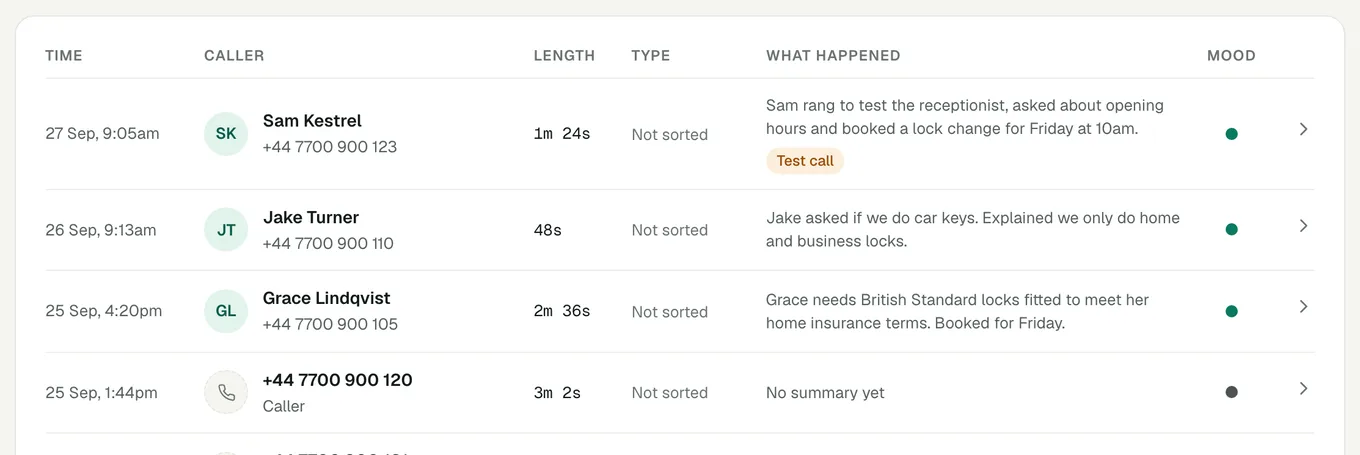
Test each situation you set up. Decline a call to check the busy code, and switch your phone to flight mode to check the unreachable code. If you added your own number under Settings, then Test numbers, calls from it are marked "Test call" and are left out of your allowance and billing.
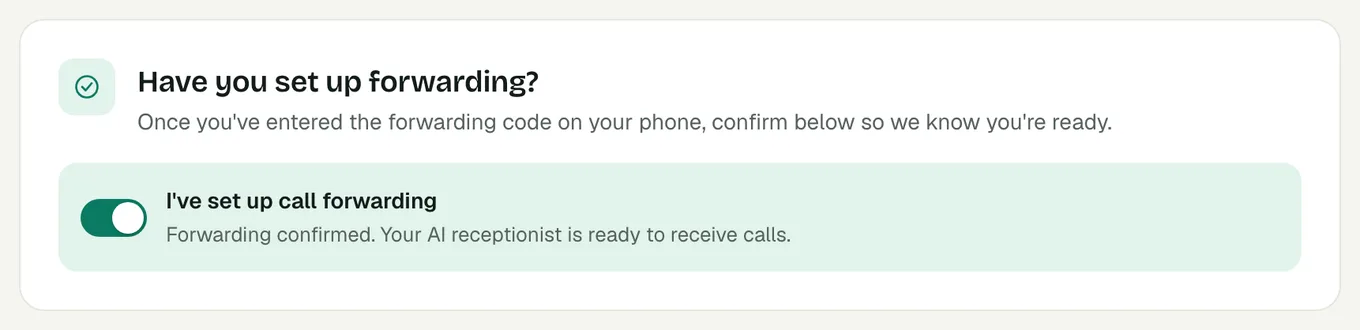
When forwarding works, go to Settings, then Call forwarding, and switch on "I've set up call forwarding". If Voco sees no calls in the first day after you go live, it emails you a reminder to check your forwarding.
How do I switch forwarding off?
Each situation has its own cancel code, dialled the same way. Cancelling stops calls going to Voco, but it does not bring back your old voicemail, because the forwarding codes replaced it. To get voicemail back, ask your network to set it up again.
##61###67###62#If you forward every call only outside working hours, dial **21*01632960123# when you finish for the day and #21# when you start again. Once registered, *21# switches it back on without your number.