To set your Voco greeting, go to Settings, then Receptionist, edit Greeting script under Your receptionist, and press Save changes. Voco's away message, the words used when you are closed, is under Greeting and away messages on the same page. Both start with suggested wording for your industry, so you can keep it, change a few words or write your own. Changes reach your receptionist when you save.
How do I change the Voco greeting?
The Voco greeting is the first thing every caller hears, so it should name your business and sound like you. It starts with suggested wording based on your industry. A trades business, for example, starts with "Good morning, thank you for calling" and your business name, then "I'm your AI receptionist and I'm here to help".
- In your Voco dashboard, go to Settings, then Receptionist.
- In the Your receptionist card, edit Greeting script. It can be up to 1,000 characters, but one or two short sentences work best on the phone.
- Press Save changes.
- Ring your Voco number to hear it. See how to make your first test call.
To go back to the suggested wording, press Reset to suggested wording beside the box, then save.
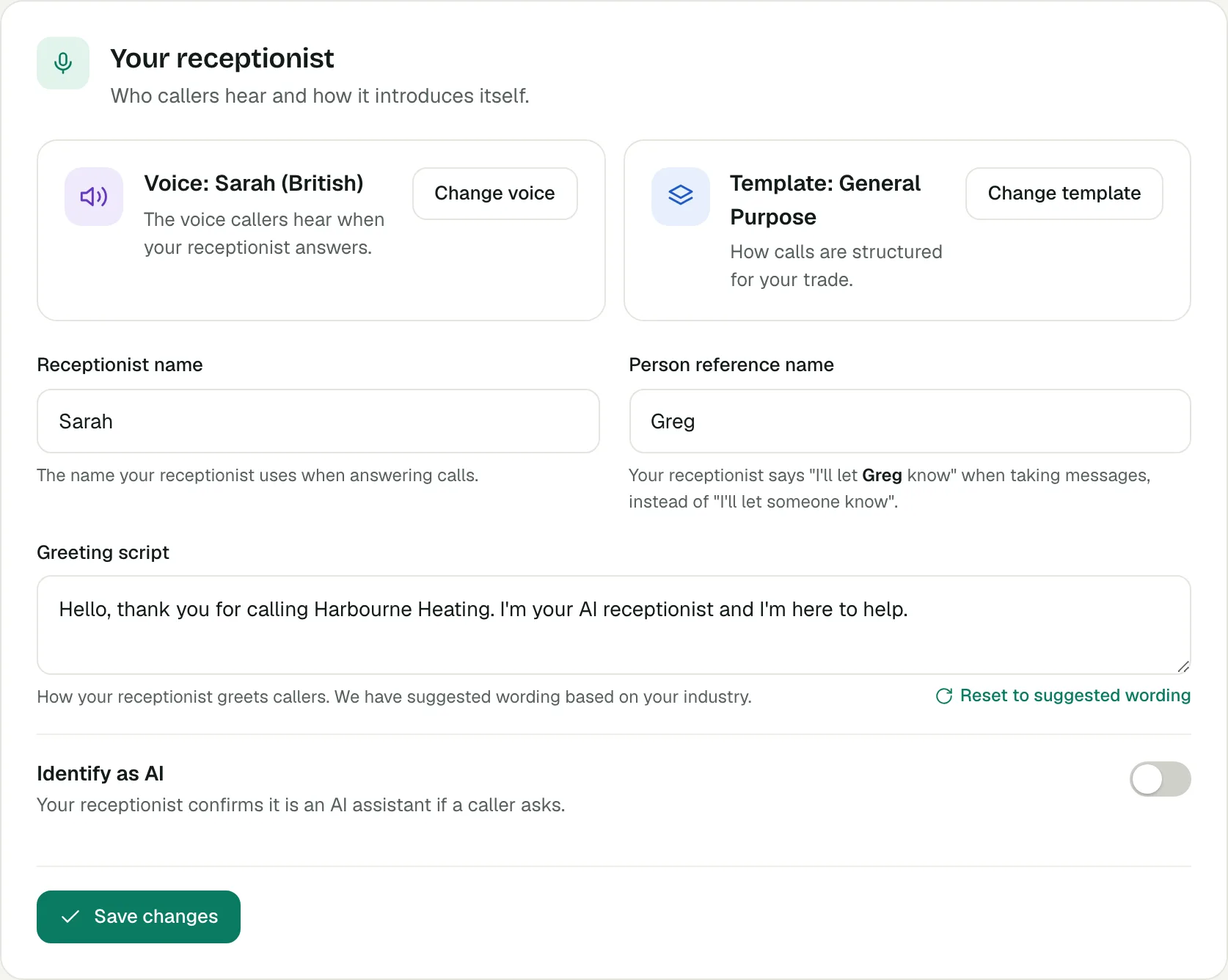
Voco fixes the greeting when you save, not when a call comes in, so it swaps "Good morning", "Good afternoon" and "Good evening" for "Hello". Otherwise a caller at 8pm would hear "Good morning". The receptionist still uses the right greeting for the time of day later in the call.
The Receptionist page also has a Greeting message box under Greeting and away messages. Callers do not hear that box on the phone: the Greeting script is the one that counts.
What does the away message do?
The away message is what Voco's receptionist says when a caller rings outside your business hours. It is used together with After-hours mode, which sets what the receptionist does when you are closed. After-hours mode is "Take messages only" unless you change it, so the receptionist says you are closed and takes a message for a callback.
- On the Receptionist page, find Greeting and away messages.
- Edit Away message, up to 1,000 characters. Say when you reopen if that helps, such as "We're open again from 8am".
- Press Save messages.
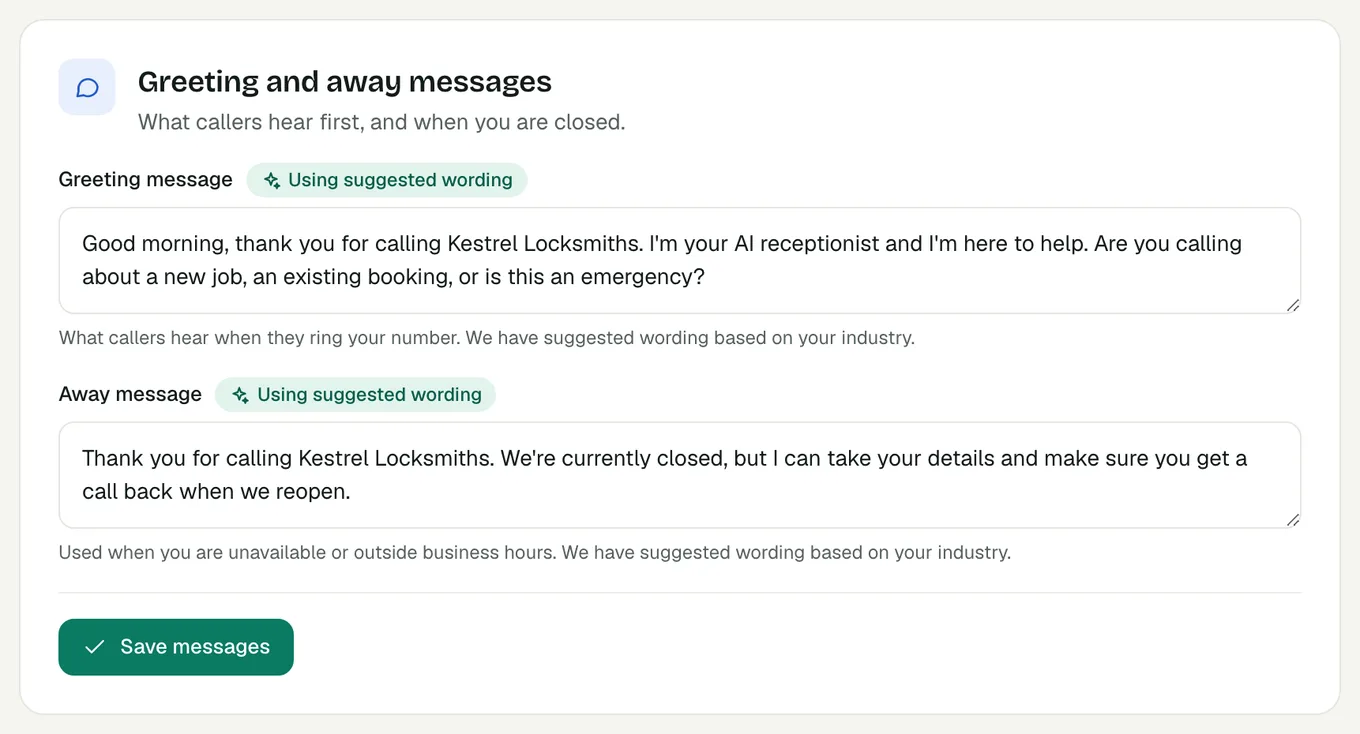
The suggested away message depends on your industry. If you have switched on emergency call handling, it also tells callers how to flag an emergency. Your opening hours come from Settings, then My business, then Business hours: see how to set up Voco in your first hour.
What name does my receptionist use?
Voco's receptionist answers with the name in Receptionist name, such as Sarah. The Person reference name is who it says it will pass messages to. Type "Greg", "Dr Smith" or "the team", and callers hear "I'll let Greg know" rather than "I'll let someone know".
- In the Your receptionist card, fill in Receptionist name.
- Fill in Person reference name. Leave it blank and the receptionist uses your primary contact's first name, or "the team".
- Press Save changes.
The same name appears in the Callback timeframe line under Call behaviour, which tells callers when that person will get back to them. "As soon as possible" is used unless you choose another option. Pick a receptionist name that suits the voice you chose, because a caller who hears a man's voice introduce itself as Sarah notices.
Does Voco tell callers it is an AI?
Yes, by default. Identify as AI is on unless you switch it off, and it means the receptionist confirms it is an AI assistant if a caller asks. The suggested greetings also say "I'm your AI receptionist", so callers know from the first sentence.
If you switch Identify as AI off, a warning headed Important: regulatory notice appears. It explains that in many places, including under the EU AI Act and GDPR, businesses may have to tell callers when they are talking to an AI, and that you take responsibility for following the rules where you operate. Pressing Save changes records that you read and accepted the notice.
With it off, the receptionist no longer offers that it is an AI, but if a caller asks whether it is a real person, it still says it is the AI receptionist. It never claims to be a person. Switching it off does not change your Greeting script, so edit the greeting too if you no longer want it to say "AI receptionist".
What does the industry template change?
The industry template sets how Voco's receptionist runs a call for your trade: the call flow and the questions it asks. A dental template asks whether the caller is a new or existing patient, a garage template asks about the vehicle, and a property template asks whether the caller is a tenant or a landlord. Businesses without one use General Purpose.
- In the Your receptionist card, find Template: followed by the current template's name.
- Press Change template and choose the template for your trade, or General Purpose.
The new template applies straight away, with no save button. A template brings its own default services, so if your receptionist's instructions are nearly full, Voco may refuse the change and explain why. See how to teach Voco about your business for the room-left meter. For how the trade templates work on calls, see Voco call handling and the pages for trades, clinics and property businesses.
What do my callers hear?
With the settings in this guide, a caller to a plumbing business might hear: "Hello, thank you for calling Smith Plumbing. I'm your AI receptionist and I'm here to help." If they leave a message, the receptionist says "I'll let Greg know", and Greg will get back to them as soon as possible. Outside your hours, they hear your away message first. Every change here is free to make.