NewTwo-way texts for UK small businesses
Voco answers your customers' texts on your own 07 number
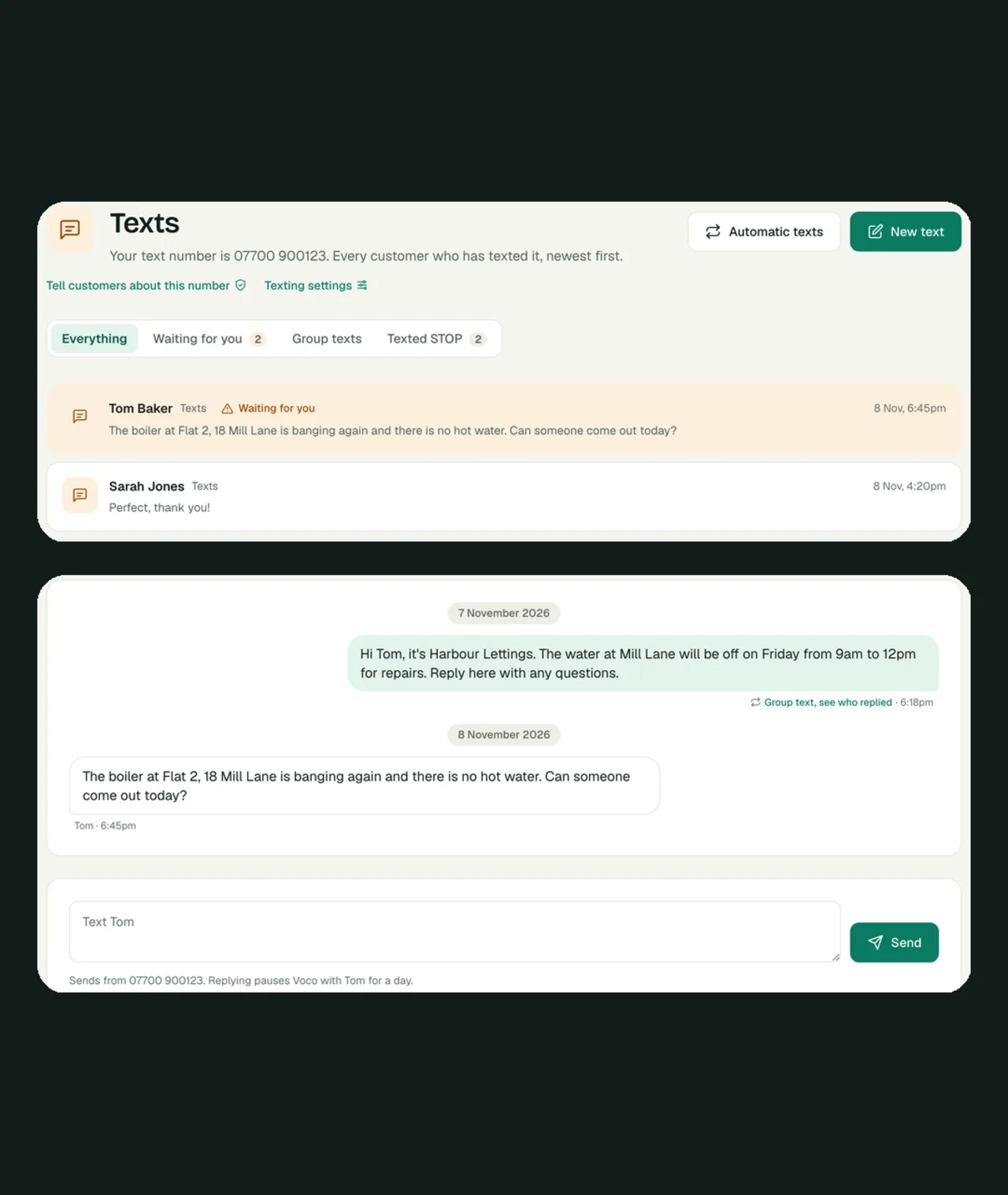
Voco gives your business its own UK mobile number for texts, so customers can text you and reply to every text you send. Voco's AI receptionist answers those texts the way you choose: only if you have not replied within a few minutes, only outside opening hours, or always. Complaints and anything you keep for yourself come straight to you, and every conversation sits in one Texts inbox beside your calls, chats and emails.
Your number is free on every monthly plan.
Voco texts at a glance
- Your number
- A UK 07 mobile number of your own, which customers can text and reply to
- Who answers
- You first, then Voco after the wait you choose, or Voco out of hours, or always
- Group texts
- One text to a day's bookings, lapsed customers or a list, each copy with their own name
- Price
- The number is free on monthly plans. Each text costs 9.4p on pay as you go
How it works
How do two-way texts work with Voco?
Voco two-way texts work in four steps: your business gets its own 07 number, every text Voco sends your customers comes from it, customers reply or text it first, and Voco's receptionist or your team answers from one inbox.
- 01
You get your own 07 number
Turn texting on under Settings, then Texts. Voco finds a UK mobile number for you, or uses your Voco line if it is already a 07 number. It usually takes about a minute.
- 02
Your texts come from it
Booking confirmations, reminders, follow-ups and payment links all go from your number instead of a sender name, so customers can reply to every one of them.
- 03
Customers text you
A reply, a question, or a photo of a leaking pipe arrives in Texts in your dashboard, and Voco alerts you the way your notification settings say.
- 04
Voco or your team answers
Voco's receptionist answers from your prices, areas and opening hours, or leaves it to you. Reply from the conversation and Voco steps back from that customer for a day.
Who answers
When does Voco answer a text?
Voco answers a customer's text in one of four ways you choose under Settings, then Texts: never, only if you have not replied within a wait you set from 2 minutes to an hour, only outside your opening hours, or always. You can change it at any time.
- If I haven't replied in 5 minutesRecommendedYou get the first go at every text, and Voco answers only when nobody has. Choose a wait of 2, 5, 10, 15 or 30 minutes, or an hour. Customers are never left waiting.
- Outside opening hoursBusy in the dayYou reply during the day, and Voco covers the evenings and weekends, going by the opening hours on your My business page.
- AlwaysHands offVoco answers every text straight away, and texts sent within a few seconds of each other are answered together. You can still step in on any conversation.
- I'll reply myselfFull controlVoco never answers. Every text lands in your inbox and you get an alert, so nothing is missed while you are on a job.
Staying in charge
What does Voco leave for you to answer?
Voco never answers a text about something you keep for yourself: complaints, repairs and damage, prices it does not know, anyone asking for you, and any topic you add, such as quotes over £500.
Topics you choose
For anything on your list, the receptionist tells the customer the team will reply soon, and Voco alerts you straight away.One customer at a time
Switch a conversation to I'll reply and Voco stays out of it until you switch it back. Useful for a delicate renewal or a long-standing customer.After you reply
When you or your team text a customer, Voco stays quiet with them for a day, so you never talk over each other.Photos
Voco keeps every photo a customer sends. The receptionist cannot see photos, so it tells the customer the team will look, and you see the picture in the conversation.
Why a mobile number
Why do business texts need a mobile number to get replies?
Voco gives each business its own 07 mobile number because customers can only reply to a text from a real mobile number. A sender name, such as your business name in place of a number, cannot receive replies, and UK landlines cannot receive texts at all.
| Your Voco 07 number | A sender name | Your personal mobile | |
|---|---|---|---|
| Customers can reply | Yes, to every text | No | Yes |
| Answered when you are busy | Yes, by Voco's receptionist, when you choose | No replies to answer | Only when you pick up your phone |
| Your team sees the texts | Yes, in one inbox | No replies to see | No, only on your phone |
| Texts kept with the customer's calls and emails | Yes, on one timeline | No | No |
| Texts the whole day's bookings at once | Yes, each with their own name | One-way only | One by one |
Group texts
How do you text a group of customers?
Voco texts a group of customers from New text in four steps: pick the group, start from a ready-made text, choose when it goes, and press Send or Schedule. Each person gets their own copy, with their own name, from your number, and every reply comes back to you.
- 01
Pick the group
Everyone booked on a day, customers not booked in 3, 6 or 12 months, a list you uploaded or one tag of it, or all customers with a mobile number.
- 02
Start from a ready-made text
Reminder, Running late, Weather delay, Due again, Offer or Start fresh. Add their first name, street, day, time or job, and the preview shows each person's copy.
- 03
Choose when
Now, 6pm the evening before a day's bookings, or a time you pick. Voco can spread a big send over 30 minutes, so replies do not all arrive at once.
- 04
See who replied
The results page shows who replied, who still needs you, who has not replied yet and who opted out, with a link to each conversation.
Automatic texts
Which texts can Voco send on its own?
Voco sends four automatic texts once you switch them on: a reminder before each booking, a nudge when a customer is due again, a review request after a job, and one follow-up on an unbooked quote. Voco answers the replies to all four.
Day-before reminder
Before each booking, the customer gets a reminder with a link to confirm, change or cancel. See Voco reminders.Due again
When a customer who asked to be reminded is due again, for a boiler service or an annual check, Voco texts them to book the next one.Ask for a review
After a job, Voco asks for a review with your review link, never more than once every 6 months. See Voco reviews.Quote follow-up
Two days after somebody asked for a price and did not book, Voco checks in once. See Voco follow-ups.
The rules
Is it legal to text customers from a business number in the UK?
Voco keeps texts to your own customers about their bookings, jobs and questions as service messages, which UK businesses may send. Marketing texts, such as offers, need consent or the soft opt-in under the Privacy and Electronic Communications Regulations (PECR), with a way to opt out every time, and Voco builds both rules in.
STOP is always honoured
A customer who texts STOP, STOPALL, UNSUBSCRIBE, QUIT or OPTOUT gets nothing more from your number until they text START. They show under Texted STOP in your inbox.Offers go only to people who have not said no
Voco spots a text that reads like an offer and sends it only to customers who have not said no to offers, and to nobody who had an offer in the last 28 days.Your business name in every text
The ready-made texts open with your business name, so customers know who is texting before they read on.The ICO's own guidance
The ICO's guide to electronic mail marketing sets out the soft opt-in and when consent is needed.
Cost
What do two-way texts cost?
Voco gives your business its text number free on every monthly plan, and each text you send comes out of your plan's credits. On pay as you go the number is £3 a month, and free in any month after one in which you sent 100 or more texts, and each text costs 9.4p. See the plans.
Long texts
A text over 160 characters goes as more than one part, and each part is charged. The reply box shows how many your message will use.Replies
Texts your customers send you cost a little too, but much less than a text you send.Before you send a group
New text shows how many people a send goes to and roughly what it costs, before you press Send.
Questions about Voco texts
Something else? Ring 0333 043 6661 and ask Voco directly.
Answers at 2am. Doesn't ask for overtime.
Hear Voco answer a call
Ring 0333 043 6661 and talk to Voco now, or set up your own AI front office today.