New Feature: Automatic SMS Follow-Up After Every Call
Voco now sends automatic SMS follow-ups to callers after every call. Customisable templates, your business name as sender. Here's how it works.
Kosisochukwu Etimbuk-Udoekong
Author
New Feature: Automatic SMS Follow-Up After Every Call
Voco can now send an automatic text message to callers after your AI receptionist handles their call. The message goes out under your business name, confirms that their enquiry has been received, and tells them when to expect a callback. It is live now for all Voco customers and takes about two minutes to set up.
Why this matters
When someone calls your business and speaks to your AI receptionist, they get a professional, helpful experience. Their details are captured, their job or enquiry is logged, and you get a notification with everything you need to follow up.
But from the caller's perspective, the call ends and then there is silence. They gave their name and number to a voice on the phone. Now they are waiting. They do not know if their message got through. They do not know if anyone is actually going to call them back. And if they do not hear anything for a few hours, they start wondering whether they should call someone else.
That gap between the call ending and your callback is where you lose leads you have already captured. The caller was interested enough to pick up the phone. Your AI receptionist did everything right. But the silence after the call creates doubt, and doubt sends people back to Google.
An SMS follow-up closes that gap. The caller hangs up and within seconds receives a text from your business name saying something like: "Thanks for calling Smith Plumbing. Mark will get back to you within the hour." They now know their enquiry landed. They know a real person has their details. They wait for your callback instead of calling the next business on the list.
How it works
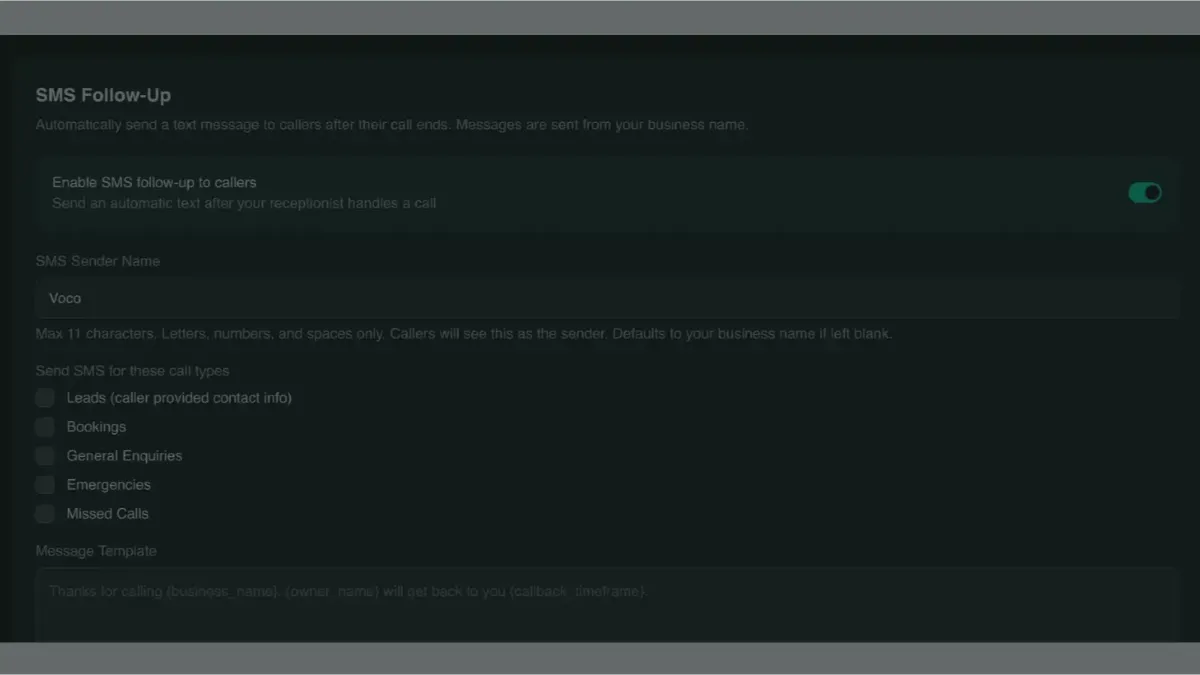
The feature is built into your Voco dashboard under Receptionist Settings. You enable it with a single toggle and configure three things.
First, the sender's name. This is what the caller sees as the "from" name on the text message. It can be up to 11 characters and defaults to your business name. So if your business is called MH Automotive, the caller sees a text from "MH Automoti" (or whatever fits within 11 characters). This is a one-way message. Callers cannot reply to it, which keeps things simple and avoids creating a channel you would need to monitor.
Second, which call types trigger a follow-up? You can choose to send SMS for leads, bookings, general enquiries, emergencies, or missed calls. Most businesses enable it for leads and bookings at a minimum. You might choose not to send one for spam calls, which Voco filters out automatically.
Third, the message template. Voco gives you a default template that works well out of the box, but you can customise it however you like. The template supports placeholders that get filled in automatically for each call: your business name, the caller's name, your name or the name of whoever handles callbacks, your callback timeframe, and your website address. A typical message might read: "Thanks for calling Jones Electrical, Sarah. Dave will get back to you within the hour. Visit joneselectrical.co.uk for more info."
The dashboard shows you a live preview of the message as you edit it, including the character count, so you can see exactly what the caller will receive.
What this looks like for the caller
Let's say a homeowner calls your plumbing business at 3pm on a Tuesday. You are on a job and cannot answer. Your Voco receptionist picks up, has a natural conversation, captures their name, number, address, and the nature of the problem, and sends you a full summary.
Fifteen seconds after the call ends, the caller receives a text message from your business name: "Thanks for calling Thompson Plumbing, John. Dave will get back to you within the hour."
John now knows three things. His call was handled properly. A real person called Dave is going to ring him back. And it will happen within the hour. He puts his phone down and waits. He does not call the next plumber on Google.
That is the difference this feature makes. It converts a one-sided experience (caller hopes someone got their message) into a confirmed exchange (caller knows exactly what happens next).
The business case for a 30-second text
The cost of sending an SMS through Voco is a few pence per message. The cost of losing a lead you have already captured is hundreds or thousands of pounds, depending on your industry.
Think about the calls your receptionist handles on a typical day. Every one of those callers gave you their details. They are warm leads. They wanted your help. The only question is whether they are still waiting for your callback when you are ready to ring them, or whether they have already moved on.
A follow-up SMS does not replace the callback. It holds the lead in place until you can make it. It is the difference between calling someone back and hearing "great, I've been expecting your call" versus "sorry, I already booked someone else."
For tradespeople who might not be able to return calls until the end of the working day, this is particularly valuable. A caller who spoke to your receptionist at 9am and heard nothing by 4pm is almost certainly gone. A caller who received a text at 9:01am confirming you will be in touch is far more likely to wait.
How to set it up
Log in to your Voco dashboard and go to Receptionist Settings. Scroll to the SMS Follow-Up section. Enable the toggle, check the call types you want to trigger a message, customise your template if you want to, and save. The whole process takes less than two minutes.
If you have not set a sender name, Voco will use your business name automatically, trimmed to fit the 11-character limit. You can change this at any time.
The feature is available on all Voco plans at no extra charge.
Common questions about SMS follow-up
Can callers reply to the text message?
No. SMS follow-ups are one-way messages sent from your business name using an alphanumeric sender ID. This means callers see your business name instead of a phone number, which looks more professional, but it also means they cannot reply to the message. If they need to get in touch, they will call your number again.
Does this cost extra?
The feature itself is included on all plans at no additional charge. SMS messages are sent through Voco's platform and the per-message cost is included in your plan.
Can I send different messages for different call types?
The current version uses a single template for all enabled call types. The placeholders (business name, caller name, callback timeframe) personalise each message automatically. If you need different messages for different scenarios, that is something Voco is considering for a future update.
What happens if the caller's phone number was not captured?
If the AI receptionist could not capture a valid phone number during the call, no SMS is sent. The system only sends follow-ups to calls where a phone number was successfully collected.
Is this GDPR compliant?
Yes. The SMS is a service message directly related to the caller's enquiry, not a marketing communication. It confirms receipt of their call and provides information about the next step. This falls under legitimate interest as defined by UK GDPR. Voco does not use caller numbers for marketing purposes and does not share them with third parties. Voco is ICO registered and operates a GDPR-first approach across all features.